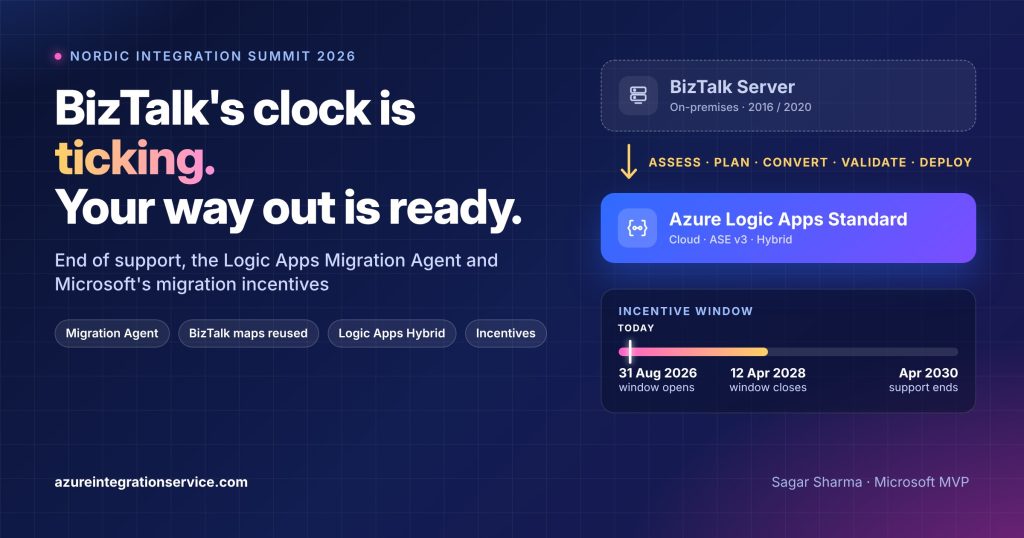

On 30 September 2026, Azure Service Bus stopped accepting the protocol that the BizTalk SB-Messaging adapter has used for years. It was a small, very concrete reminder that the BizTalk Server clock is running. At Nordic Integration Summit (NIS) 2026 in Stockholm, Harold Campos, Principal Product Manager at Microsoft, used his session on moving from BizTalk Server to Azure Logic Apps to answer the question every BizTalk team is now asking: how do we actually get out, and who is going to help us?
His answer came in three parts. First, the Logic Apps Migration Agent, an open-source, AI-assisted VS Code extension that assesses, plans, converts, validates and deploys BizTalk workloads. Honestly, it is one of the most impressive migration tools I have seen. Second, a wave of Logic Apps Standard features built to make BizTalk migrations lower-risk, including reusing your existing BizTalk maps and running on your own infrastructure with Logic Apps Hybrid. Third, Microsoft migration incentives for BizTalk customers and White Glove support from the product group. Here is what was announced, what the BizTalk end of support dates really mean, and how I would use all of it, with slides from the session.
This is my third write-up from NIS 2026. The first covers what is new with Logic Apps Automation and the second covers the new Logic Apps developer experience (SDK, CLI and Connector Namespace). If you are new to the Migration Agent, my earlier posts on building an AI agent to migrate BizTalk Server to Azure and the BizTalk migration tool Microsoft shipped in May give the background.
A note on status: several capabilities below are in preview or marked “coming soon”, and the incentive programme is described as an “expected” window with details handled through your Microsoft account team. I could not find public terms for the incentives yet. I have marked the status of each item and will update this post as official documentation lands.
TL;DR
- BizTalk end of support is real and dated. BizTalk Server 2020 is the final version. Mainstream support ends on 11 April 2028 and extended support on 9 April 2030. BizTalk Server 2016 leaves extended support on 11 January 2027, and SBMP on Azure Service Bus was retired on 30 September 2026.
- The Logic Apps Migration Agent is an open-source VS Code extension powered by GitHub Copilot. Three Copilot agents (
@migration-analyser,@migration-planner,@migration-converter) take you through Discovery, Planning, Conversion, Validation and Deployment, with a human approval at every stage. BizTalk is fully supported, MuleSoft and TIBCO are supported, and Boomi is in progress. - Coming next: migrations to Logic Apps inside the GitHub Copilot modernization agent, for portfolio-scale assessments with custom skills and rulebooks.
- Reuse, do not rewrite: the new Data Mapper (preview) is BizTalk map compatible. Open a
.btmmap in VS Code, compile it to XSLT, test it and deploy it to Logic Apps. - Run where your data lives: for BizTalk migrations, choose Logic Apps Standard on a Workflow Service Plan, ASE v3 or Hybrid (your own Kubernetes, managed from Azure through Azure Arc).
- Money and people: Microsoft offers migration incentives for BizTalk customers in an expected window of 31 August 2026 to 12 April 2028, plus White Glove product-group support for your delivery team. Both start with your Microsoft account team.
BizTalk Server End of Support: The Dates That Matter
In its BizTalk Server product lifecycle update, Microsoft confirmed that BizTalk Server 2020 is the final version of the product and positioned Azure Logic Apps as its strategic successor. There will be no BizTalk Server 2024 or later. Host Integration Server is being split off as a standalone product (HIS 2028), so mainframe connectivity gets its own future, but the BizTalk engine does not.
| Milestone | Date | What it means for you |
|---|---|---|
| SBMP retired on Azure Service Bus | 30 September 2026 (passed) | SB-Messaging adapters still on SBMP can no longer connect. Microsoft has a guide on validating that your adapter really uses AMQP. |
| BizTalk Server 2016 extended support ends | 11 January 2027 | No more security updates for 2016. Upgrading to 2020 buys time, migrating removes the problem. |
| HIS 2028 (standalone) | September 2027 (planned) | Mainframe and midrange connectivity continues outside BizTalk. |
| BizTalk Server 2020 mainstream support ends | 11 April 2028 | Security fixes only from here on. This is also the day after the incentive window is expected to close. |
| BizTalk Server 2020 extended support ends | 9 April 2030 | No updates, no patches, no support. |
2030 sounds far away. It is not. A medium BizTalk estate with a few hundred interfaces, partner onboarding, EDI testing and a freeze period or two easily takes 18 to 24 months to migrate properly. Extended support is a safety net, not a migration plan, and as the SBMP retirement showed, the platform around BizTalk can move faster than BizTalk’s own lifecycle.
Meet the Logic Apps Migration Agent
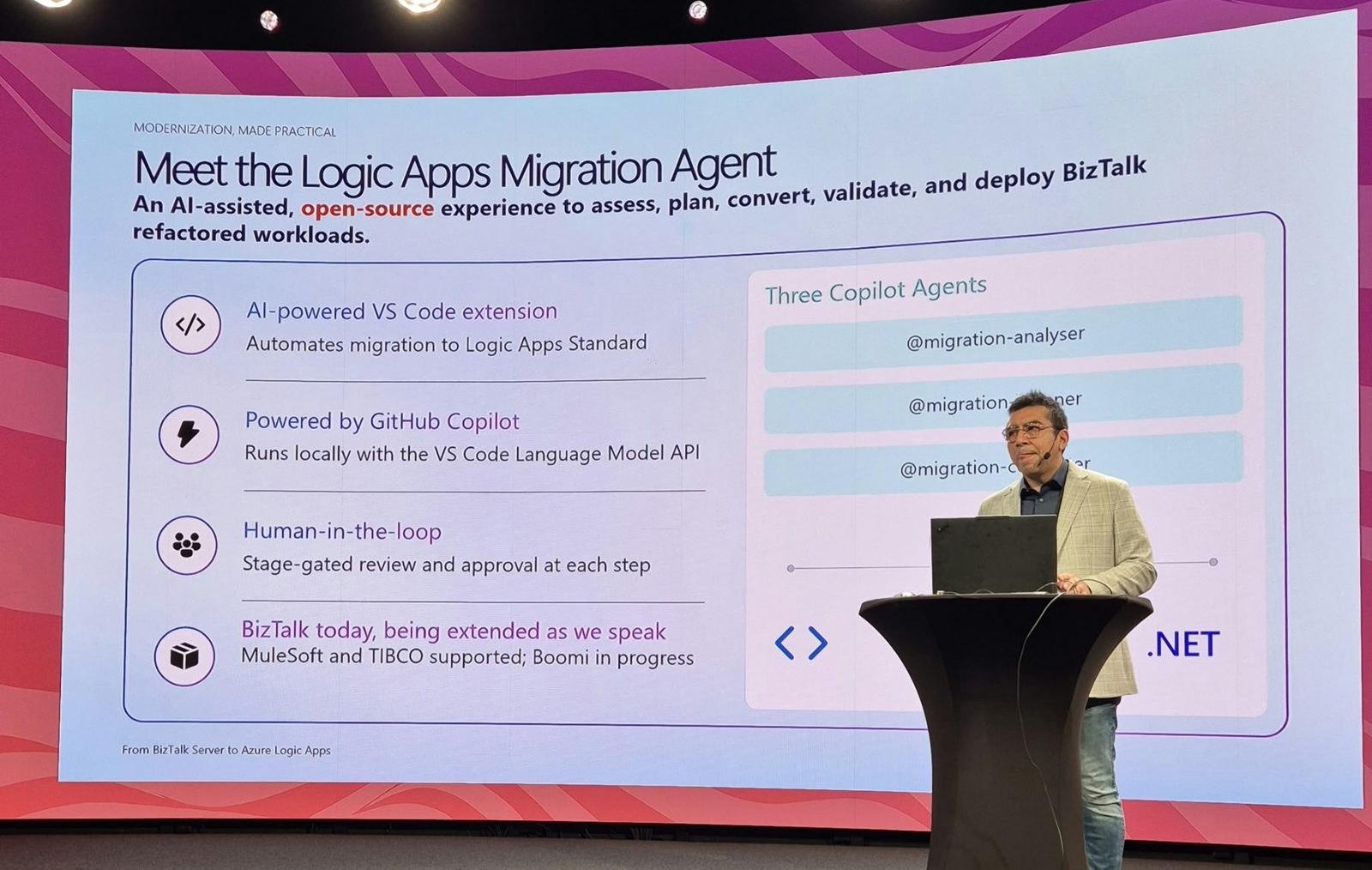
The Logic Apps Migration Agent is an AI-assisted, open-source experience to assess, plan, convert, validate and deploy refactored BizTalk workloads to Azure Logic Apps Standard. Harold highlighted four things about it:
- AI-powered VS Code extension that automates the migration to Logic Apps Standard.
- Powered by GitHub Copilot, running locally in VS Code through the VS Code Language Model API, so it uses the Copilot models you already have.
- Human-in-the-loop: stage-gated review and approval at each step. The agent proposes, you decide.
- BizTalk today, extended as we speak: MuleSoft and TIBCO are supported and Boomi is in progress. (The Marketplace listing still describes MuleSoft and TIBCO as partial, so check the release notes for your version.)
Under the hood, three GitHub Copilot agents share the work across a five-stage pipeline:
| Agent | Stage | What it does |
|---|---|---|
@migration-analyser | Discovery | Examines the BizTalk artifacts, detects flow groups and generates architecture diagrams and message-flow visualisations. |
@migration-planner | Planning | Creates a migration plan per flow, with action mappings from BizTalk patterns to Logic Apps and a gap analysis. |
@migration-converter | Conversion | Runs the conversion tasks and generates Logic Apps Standard workflows, maps and connections. |
What the demo showed
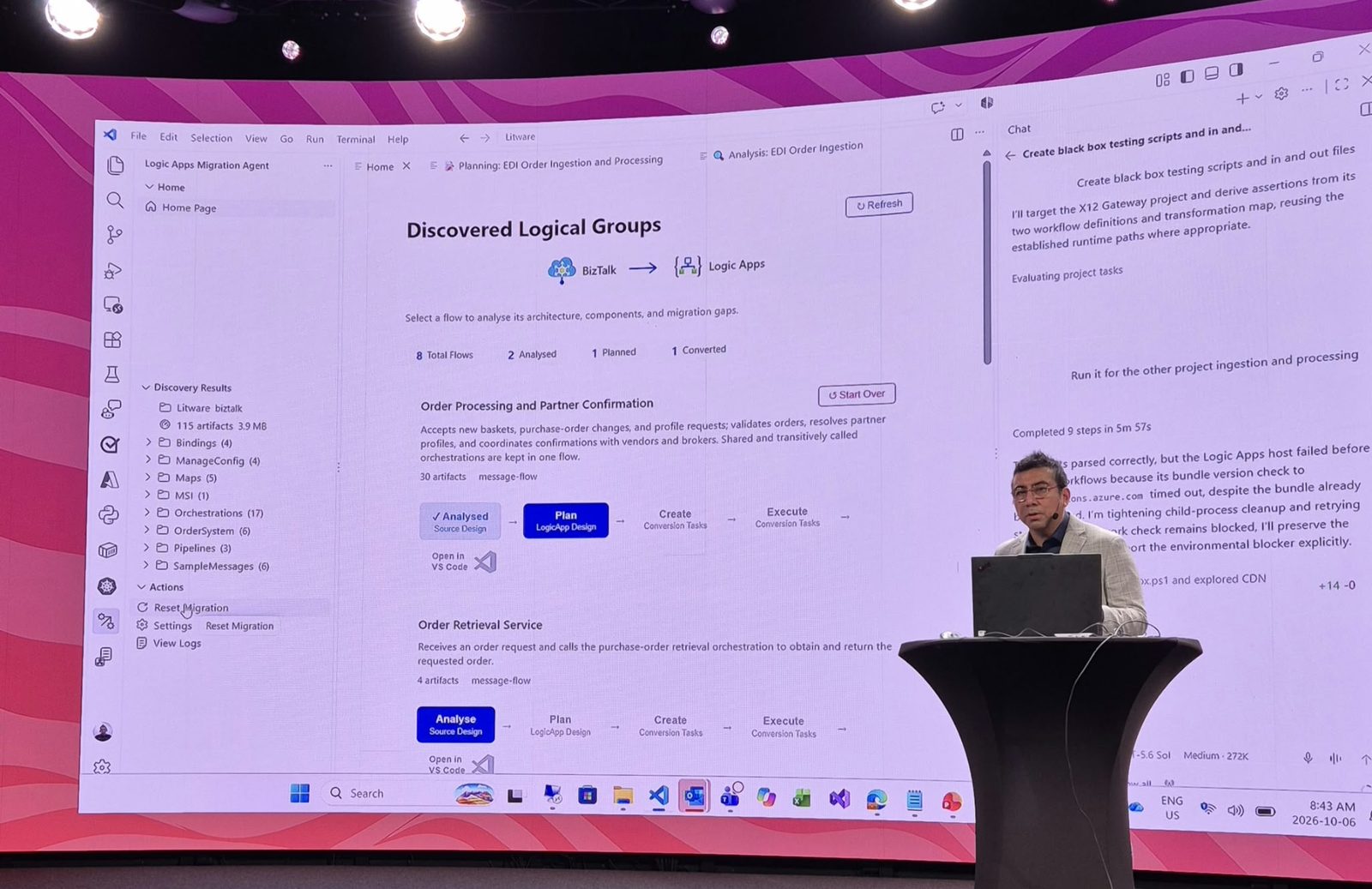
The demo used a sample BizTalk solution (Litware) with 115 artifacts: 17 orchestrations, 5 maps, 3 pipelines, 4 binding files, configuration and sample messages. The agent did not present this as one big pile. It grouped the artifacts into 8 logical flows, such as Order Processing and Partner Confirmation (30 artifacts) and Order Retrieval Service (4 artifacts), each with a plain-English description of what the flow does.
Each flow then moves through its own track: Analyse (source design), Plan (Logic Apps design), Create (conversion tasks) and Execute (conversion tasks), with an “Open in VS Code” option at every point. The dashboard showed 8 flows, 2 analysed, 1 planned and 1 converted, which is exactly how a real migration runs: flow by flow, wave by wave.
Two details from the Copilot chat pane stood out to me:
- Test generation. Harold asked the agent to “create black box testing scripts and in and out files”. It targeted the converted project, reused the workflow definitions and the transformation map, and derived assertions from them. For BizTalk teams that never had proper regression tests, that alone is worth a lot.
- Honest failure reporting. When the local Logic Apps host hit an environment problem (an extension bundle version check timed out), the agent said so, tried to clean up and retry, and stated it would report the environmental blocker explicitly instead of pretending the run was green. That is the behaviour you want from an agent working on production integrations.
What you need to try it: VS Code, a GitHub Copilot subscription, the Azure Logic Apps (Standard) extension, Docker Desktop, the Azure CLI and an Azure subscription for deployment. Install it from the VS Code Marketplace, open your BizTalk solution folder and follow the guided stages. The source is on GitHub (Azure/logicapps-migration-agent) under the MIT licence, and contributions for new source platforms are welcome.
Status: preview. Supported BizTalk versions are 2016 and 2020. Harold’s feature slide also lists “deeper planning and reporting” for the Migration Agent as a new capability.
Coming Next: Logic Apps Migrations in the GitHub Copilot Modernization Agent
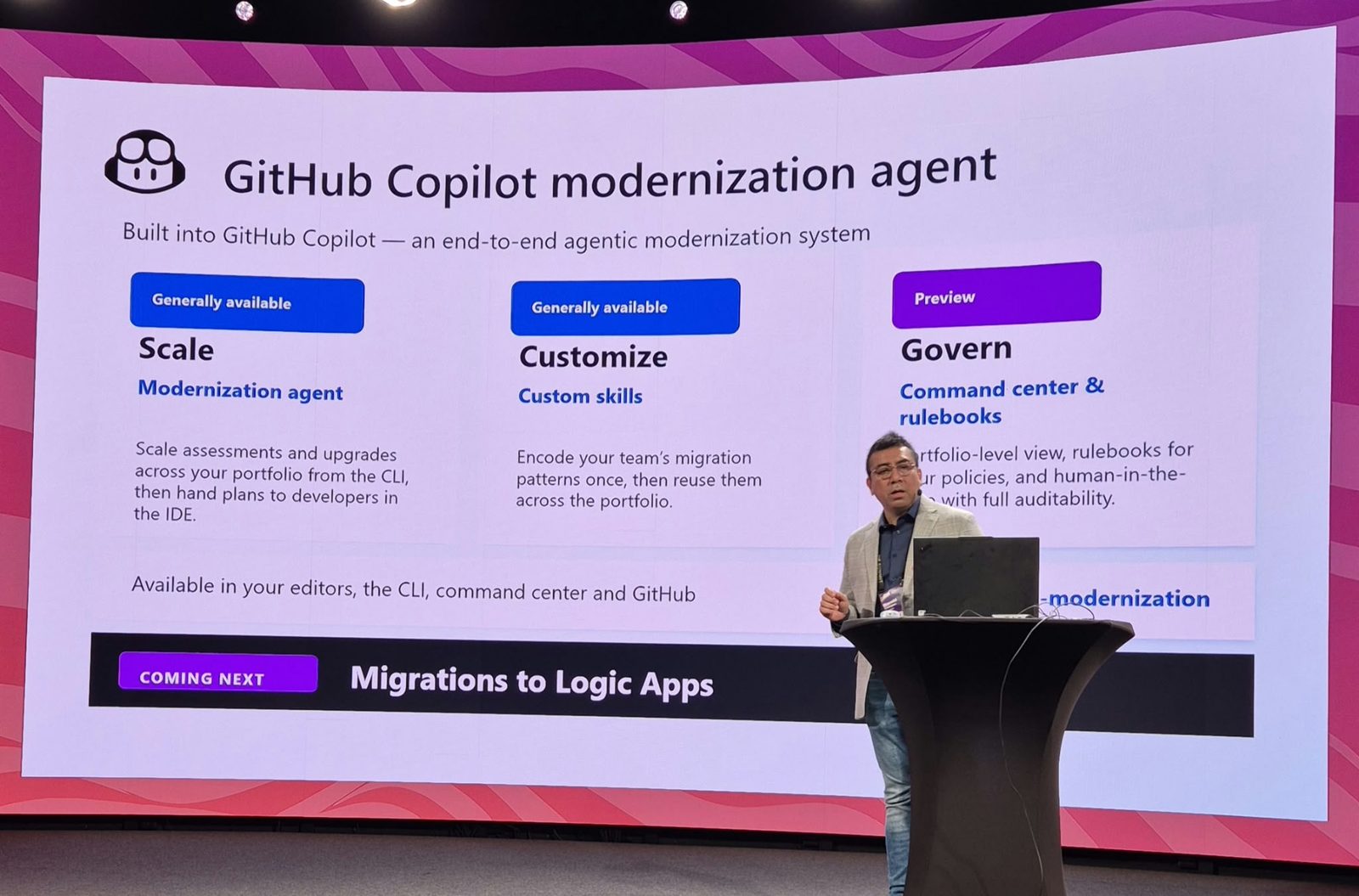
The Migration Agent works one solution at a time inside VS Code. Large enterprises do not have one BizTalk solution. They have dozens of applications, several BizTalk groups and a backlog of interfaces nobody fully remembers. That is where the GitHub Copilot modernization agent comes in, described on the slide as “an end-to-end agentic modernization system” available in your editors, the CLI, the command center and GitHub:
- Scale (generally available): run assessments and upgrades across your portfolio from the CLI, then hand plans to developers in the IDE.
- Customize (generally available): custom skills that encode your team’s migration patterns once and reuse them across the portfolio.
- Govern (preview): a command center with a portfolio-level view, rulebooks for your policies, and human-in-the-loop with full auditability.
The banner at the bottom said it all: coming next, migrations to Logic Apps. Put that together with the Migration Agent and you get a credible path for portfolio-scale BizTalk modernisation: assess every BizTalk application centrally, encode your organisation’s conventions (naming, error handling, logging, which tier to target) as custom skills and rulebooks, and let delivery teams execute flow by flow with the same guardrails.
Reuse Your BizTalk Maps in the New Data Mapper
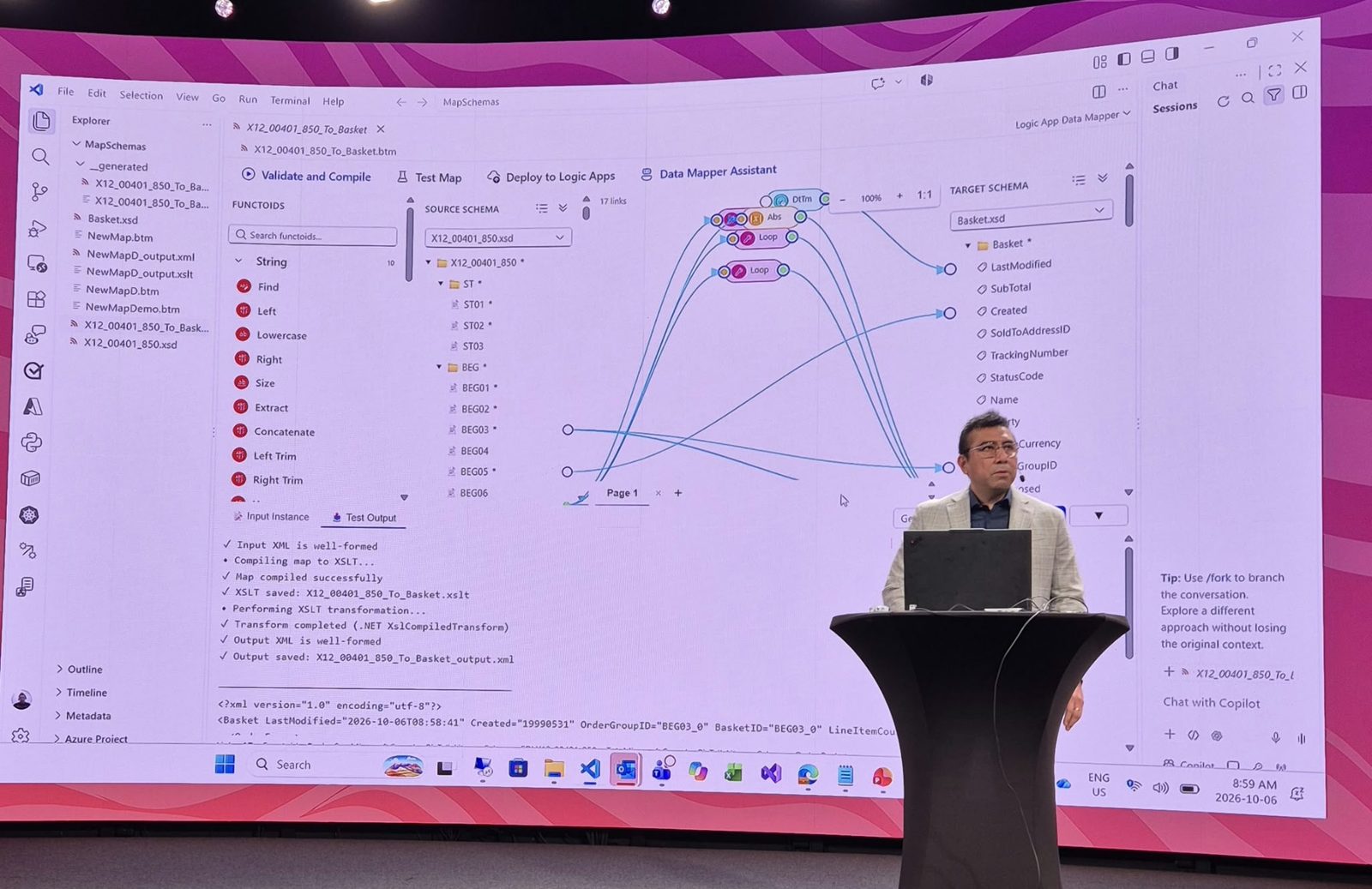
Maps are often the biggest, most business-critical and least documented part of a BizTalk estate. Think of EDI X12 and EDIFACT maps that have been tuned for years for each trading partner. Rewriting them is where many migrations lose months.
The new Data Mapper (preview) is BizTalk map compatible. In the demo, Harold opened X12_00401_850_To_Basket.btm, a BizTalk map from an X12 850 purchase order to an internal basket schema, directly in the Logic App Data Mapper in VS Code. The familiar BizTalk concepts were there: source and target schemas, links and functoids (String functions such as Find, Left, Concatenate and Trim, plus Loop and Abs). From the toolbar he could:
- Validate and Compile: the map compiled to XSLT (
X12_00401_850_To_Basket.xslt). - Test Map: run an input instance through the .NET
XslCompiledTransformand inspect the well-formed output XML. - Deploy to Logic Apps: publish the compiled map as a Logic Apps artifact.
- Data Mapper Assistant: ask Copilot for help with the mapping, alongside the new AI Data Mapping capability that generates mappings for you.
The practical consequence: your existing, battle-tested BizTalk maps can come along, be validated against the same test messages, and be deployed to Azure. Rewrite the ones you want to modernise, keep the rest.
New Logic Apps Standard Features for BizTalk Migrations
Every BizTalk migration eventually hits the same question: what is the Logic Apps equivalent of this? Microsoft has been closing those gaps. This is the list from the session:
| Capability | What it gives BizTalk teams | Status |
|---|---|---|
| New Data Mapper | BizTalk map compatible: reuse existing maps and deploy them to Azure | Preview |
| AI Data Mapping | AI-generated mappings to speed up map creation | Preview |
| New connectors: SOAP and MSMQ | Native replacements for two classic BizTalk adapters | Preview |
| Unified dashboard | Manage all your workflows from one place (think BizTalk Administration Console) | Preview |
| Dynamic connections | Set connections at runtime, the Logic Apps answer to dynamic send ports | Preview |
| Rules Engine | New XML facts action for BizTalk Business Rules Engine policies | Preview |
| Integration accounts in Hybrid | B2B and EDI artifacts now supported in Logic Apps Hybrid | Available |
| HL7 batching | Batch processing for HL7 messages, important for healthcare BizTalk estates | Available |
| Migration Agent | Deeper planning and reporting | Available (agent in preview) |
| Directories in Artifacts | Group maps, schemas and other artifacts in folders | Preview |
| Salesforce built-in connector | New built-in connector | Coming soon |
| SAP OData built-in connector | New built-in connector | Coming soon |
| AMQP 1.0 | Built-in AMQP 1.0 support (partly hidden behind the lectern in my photo) | Coming soon |
| More built-in connectors | Azure Monitor Logs, Microsoft Graph, Azure Policy, Microsoft Defender, Azure Advisor and more | Coming soon |
For anyone who has led a BizTalk assessment, the SOAP and MSMQ connectors, the Rules Engine and dynamic connections remove some of the most common “no direct equivalent” rows from the gap analysis.
Which Logic Apps Tier Should You Use for a BizTalk Migration?
The guidance on this slide was unusually direct: for BizTalk or other integration-platform migrations (TIBCO, MuleSoft, Boomi), choose Logic Apps Standard on a Workflow Service Plan, ASE v3 or Hybrid. Consumption is for SaaS integrations and event-driven automation, not for replacing an ESB.
| Tier | Use when you need | Network |
|---|---|---|
| Workflow Service Plan (single-tenant) | Mission-critical, compliant enterprise integrations | VNET integration, fixed |
| ASE v3 (App Service Environment v3) | Mission-critical, maximum scale, isolation and compliance | VNET integration, fixed |
| Hybrid (containerised runtime) | Mission-critical, data residency or predominantly on-premises workloads | Local network access, customer-managed infrastructure |
| Logic Apps Automation (preview, isolated compute) | AI-powered process automation and document processing | VNET integration |
| Consumption (serverless) | SaaS integrations and event-driven automation | Multi-tenant |
My rule of thumb: start with the Workflow Service Plan as the default landing zone for migrated BizTalk applications, use ASE v3 where you need full network isolation at scale, and use Hybrid for the flows that must stay close to on-premises systems. For the AI-driven processes you may build next to them, see my post on Logic Apps Automation.
Logic Apps Hybrid: Modernise on Your Own Infrastructure
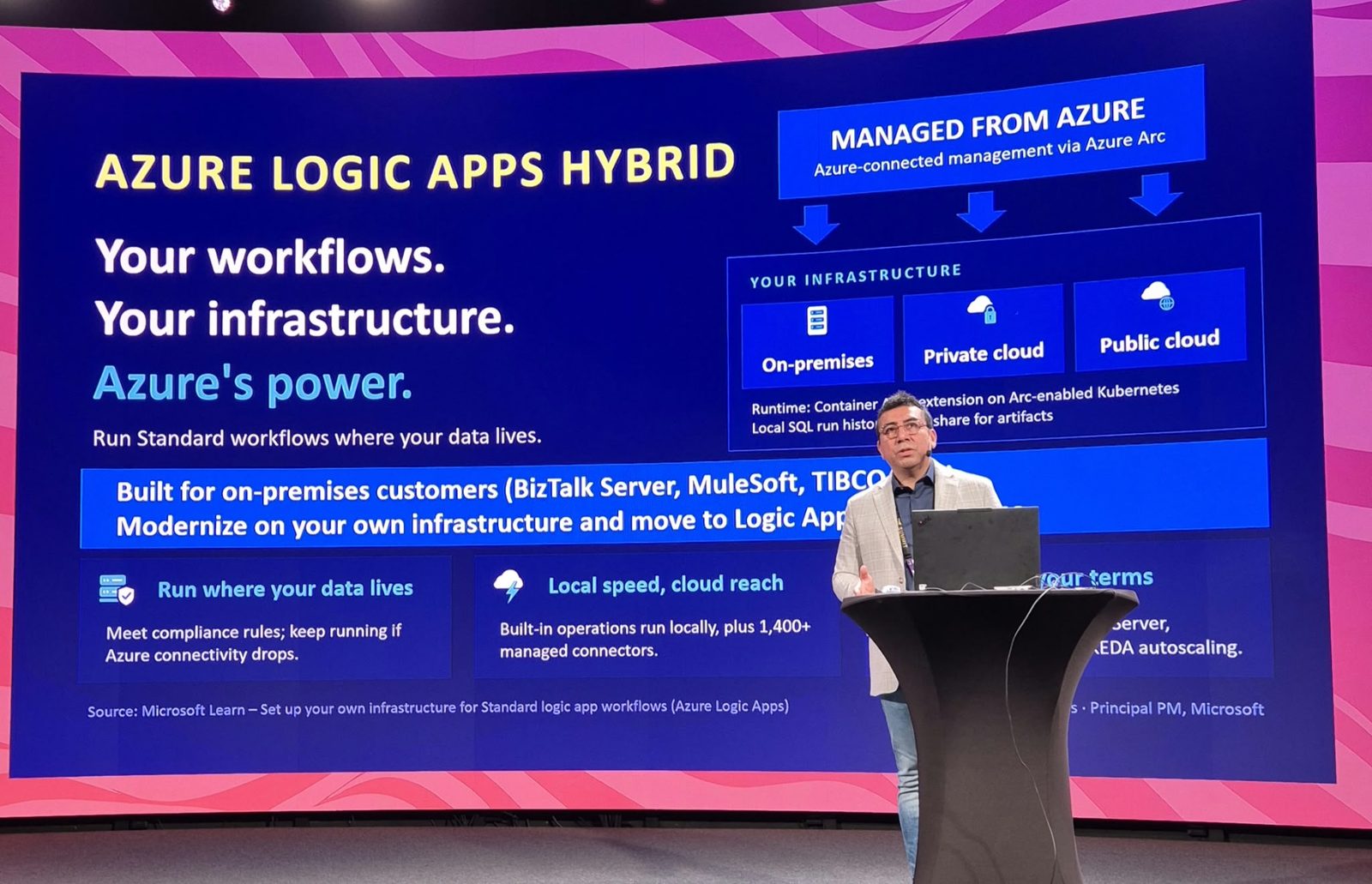
“We cannot move to the cloud” is still the most common reason BizTalk stays where it is. Data residency rules, latency to plant-floor systems, or simply a large on-premises estate. Logic Apps Hybrid takes that objection away. Harold described it as built for on-premises customers (BizTalk Server, MuleSoft, TIBCO) who want to modernise on their own infrastructure and move to Logic Apps.
- Managed from Azure: Azure-connected management through Azure Arc, with the runtime deployed on-premises, in a private cloud or in a public cloud.
- Runtime: the Azure Container Apps extension on Arc-enabled Kubernetes, with a local SQL database for run history and an SMB file share for artifacts.
- Run where your data lives: meet compliance rules, and keep running if Azure connectivity drops.
- Local speed, cloud reach: built-in operations run locally, plus access to 1,400+ managed connectors.
- Scale: KEDA-based autoscaling on your cluster, and integration accounts are now supported for B2B scenarios.
For many organisations this is the most realistic first step: move BizTalk flows to the same Logic Apps Standard runtime they would use in Azure, keep them on-premises for now, and move workloads to the cloud later without rewriting anything.
Microsoft BizTalk Migration Incentives and White Glove Support
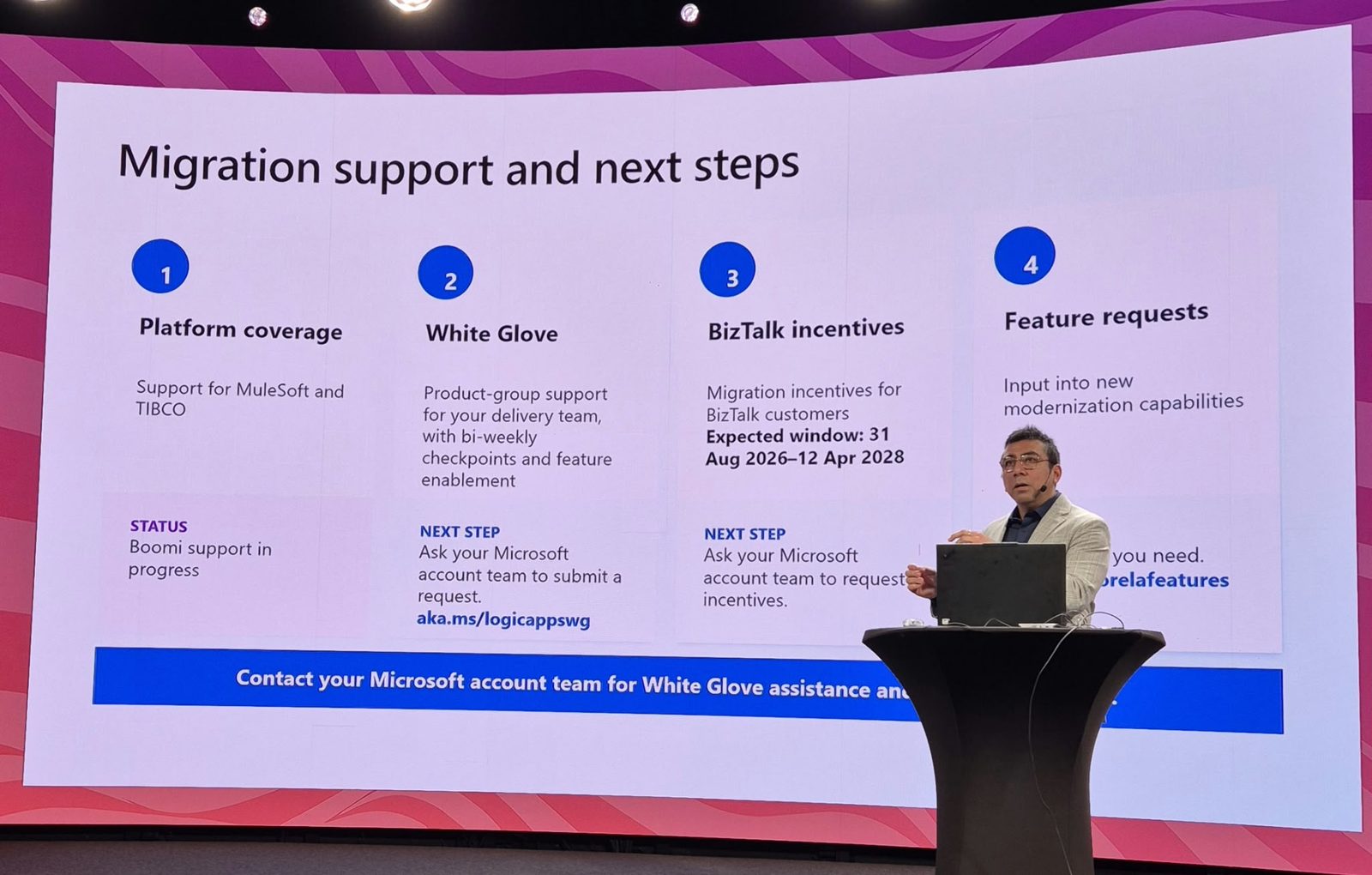
This was the slide most people photographed, and for good reason. Tools reduce effort, but budgets decide whether a migration starts. Microsoft is putting both money and people behind BizTalk migrations:
| Offer | What it is | How to get it |
|---|---|---|
| BizTalk incentives | Migration incentives for BizTalk customers. Expected window: 31 August 2026 to 12 April 2028 | Ask your Microsoft account team to request incentives |
| White Glove | Product-group support for your delivery team, with bi-weekly checkpoints and feature enablement | Ask your Microsoft account team to submit a request (aka.ms/logicappswg) |
| Platform coverage | Support for MuleSoft and TIBCO, with Boomi in progress | Same Migration Agent and programmes |
| Feature requests | Input into new modernisation capabilities | Tell the product group what you need |
Look closely at the dates. The incentive window is expected to close on 12 April 2028, the day after BizTalk Server 2020 mainstream support ends. The message is clear: the incentives are for organisations that migrate before mainstream support runs out, not for those who wait for 2030.
Microsoft has not published public terms for the incentives (amounts, eligibility or whether they apply to partner-delivered services, Azure consumption or both). In my experience, programmes like this are tied to a concrete plan. So before you call your account team, prepare:
- An inventory of your BizTalk applications, interfaces and partners. The Migration Agent’s discovery stage gives you a solid first version quickly.
- A target architecture, including which Logic Apps tier (WSP, ASE v3 or Hybrid) you will land on.
- A wave plan with dates that finishes well before April 2028, and your delivery partner if you have one.
A Practical BizTalk to Logic Apps Migration Plan
Putting everything from the session together, this is the sequence I would recommend to a BizTalk customer today:
- Fix what is already broken. Check every SB-Messaging adapter is on AMQP now that SBMP is retired, and plan the move off BizTalk Server 2016 before 11 January 2027.
- Discover. Run the Migration Agent’s discovery and analysis against each BizTalk application to get flows, dependencies and a first gap analysis.
- Engage Microsoft early. Use that inventory to request the BizTalk incentives and White Glove support through your account team.
- Choose the landing zone. Workflow Service Plan by default, ASE v3 for isolation at scale, Hybrid for on-premises and data-residency flows.
- Migrate wave by wave. Start with a representative but low-risk flow, then move by business domain. Reuse maps through the new Data Mapper and let the agent generate black-box tests from real messages.
- Run in parallel, then switch off. Compare outputs between BizTalk and Logic Apps, cut over partner by partner, and decommission BizTalk hosts as their flows move.
For a hands-on walk-through of an agent-driven migration, including the wave approach, see An AI Agent to Migrate from BizTalk Server to Azure.
My Take as an Integration Architect
- The Migration Agent changes the economics. Discovery and first-pass conversion used to take weeks of senior consultant time per application. Now a large part of that is automated, and the senior people can spend their time on design decisions and testing, where they add the most value.
- Human-in-the-loop is a feature, not a limitation. Stage gates make the agent’s work reviewable and auditable, which is exactly what risk and compliance teams will ask for. Combined with the rulebooks in the GitHub Copilot modernization agent, governance is built in rather than added afterwards.
- Refactor, do not just lift and shift. Correlation sets, convoys and long-running atomic transactions do not map one to one. Use the agent’s gap analysis as a prompt to simplify, for example replacing a convoy with Service Bus sessions, rather than recreating BizTalk inside Logic Apps.
- Map reuse is a big risk reducer. Being able to bring
.btmmaps across and test them with the same messages takes one of the riskiest parts of a migration off the critical path. - The incentive window is the real deadline. Plan as if your BizTalk end of support date is April 2028, not 2030. That is when mainstream support ends, and the incentives are expected to stop.
Frequently Asked Questions
When does BizTalk Server support end?
BizTalk Server 2020 mainstream support ends on 11 April 2028 and extended support ends on 9 April 2030. BizTalk Server 2016 extended support ends on 11 January 2027. After extended support ends, there are no more security updates or technical support from Microsoft.
Will there be a new version of BizTalk Server?
No. Microsoft has confirmed that BizTalk Server 2020 is the final version and that Azure Logic Apps is its strategic successor. Host Integration Server continues as a standalone product (HIS 2028).
What is the Logic Apps Migration Agent?
It is a free, open-source VS Code extension from Microsoft that uses GitHub Copilot agents to discover, plan, convert, validate and deploy BizTalk Server 2016 and 2020 workloads to Azure Logic Apps Standard, with a human review at every stage. MuleSoft and TIBCO are supported and Boomi is in progress. It requires a GitHub Copilot subscription.
Does Microsoft offer incentives to migrate from BizTalk to Azure?
Yes. At Nordic Integration Summit 2026, Microsoft presented migration incentives for BizTalk customers with an expected window from 31 August 2026 to 12 April 2028, as well as White Glove support from the Logic Apps product group. Both are requested through your Microsoft account team. Public terms had not been published at the time of writing.
Can I migrate from BizTalk and still run on-premises?
Yes. Logic Apps Hybrid runs Logic Apps Standard workflows on your own Arc-enabled Kubernetes infrastructure, on-premises or in a private cloud, while you manage them from Azure. It keeps running if Azure connectivity drops and now supports integration accounts.
Can I reuse my BizTalk maps in Logic Apps?
Yes, with the new Data Mapper (preview), which is BizTalk map compatible. You can open a .btm map in VS Code, compile it to XSLT, test it and deploy it to Logic Apps.
Quick Reference
| Resource | Status | Where to start |
|---|---|---|
| BizTalk Server lifecycle | Final version: 2020 | Lifecycle update · BizTalk Server 2020 lifecycle |
| Logic Apps Migration Agent | Preview, open source | Microsoft Learn · VS Code Marketplace · GitHub · Announcement |
| GitHub Copilot modernization agent | Scale and Customize GA, Govern preview, Logic Apps migrations coming next | Microsoft Learn |
| Logic Apps Hybrid | Available | Set up your own infrastructure |
| SBMP to AMQP for BizTalk | SBMP retired 30 September 2026 | Validation guide |
| BizTalk incentives and White Glove | Expected window 31 Aug 2026 to 12 Apr 2028 | Your Microsoft account team · aka.ms/logicappswg |
My suggestion: do not wait for the perfect plan. Install the Migration Agent this week, point it at one BizTalk application and look at what it discovers. That output is the start of your business case, your wave plan and your conversation with Microsoft about incentives. If you were at NIS and saw Harold’s session, I would love to hear which part will make the biggest difference for your BizTalk estate.